

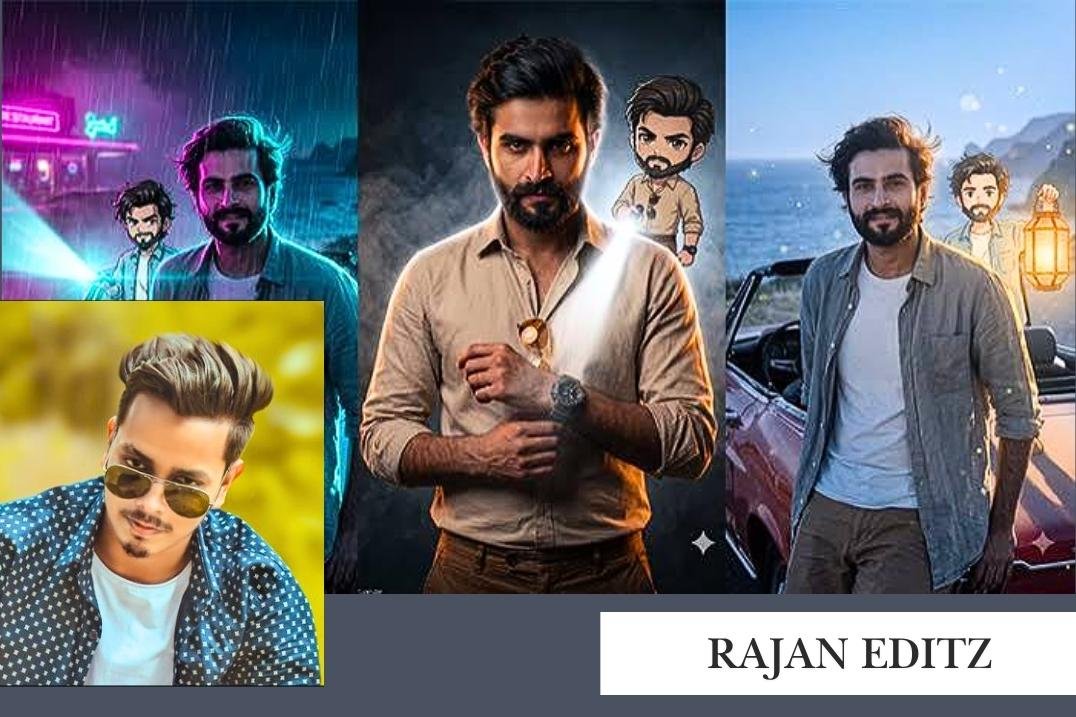
Rajan Editz is a creator linked with mobile photo editing, video editing tutorials, AI photo editing prompts, and creative resources for social media users. As Instagram Reels, YouTube Shorts, and other short-video platforms attract content creators, mobile editing tutorials become an essential source of education to support newcomers and those just starting their journey in the field. Rajan Editz offers informative content that allows people to discover editing know-how, utilise various effects, and hone their creativity with the help of their smartphones.
The creator has an active presence on multiple online platforms, including YouTube, Instagram, and the associated Rajan Template website that shares editing resources and AI prompts. This material can benefit students, influencers, and freelance editors who wish to learn new techniques and invest in developing their unique approach to editing. This article introduces Rajan Editz, their online platforms, video tutorials, and useful presets for 2026.
What Is Rajan Editz?
Rajan Editz is a content creator covering the topic of mobile editing, photo enhancement, video production, and related topics such as social media content creation. Their YouTube channel features a variety of tutorials on photo and video editing, while their website, Rajan Template, offers AI photo editing prompts, video templates, and creative resources.
The content fits beginning editors interested in learning more about the fundamentals of photo and video editing without investing in expensive software and hardware. Anyone can learn and practice photo and video editing skills by accessing the creator’s material and following their guidelines for Instagram, YouTube, and other platforms.
In addition, the creator has an Instagram account and a Telegram channel offering photo editing resources. However, individual tutorials, downloadable assets, and the range of services provided may vary.
Rajan Editz Overview
| Particulars | Details |
| Name | Rajan Editz |
| Creator | Rajan Dubey |
| Platform | YouTube, Instagram, Telegram |
| YouTube Handle | @Rajaneditz |
| Website | Rajan Template |
| Main Content | Photo and Video Editing |
| Tutorials | Mobile Editing, Reels and AI Editing |
| Resources | Presets, Templates and AI Prompts |
| Target Audience | Beginners and Content Creators |
| Official Website | https://rajantemplate.com/ |
Vision and Purpose Behind Rajan Editz
The main educational value of Rajan Editz lies in making editing techniques easier to understand and practise. Mobile editing applications offer many features, but beginners may find keyframes, transitions, colour grading, and layer management difficult to understand initially.
Step-by-step tutorials can help users overcome these challenges by demonstrating how different tools work. Presets and templates can also simplify repetitive editing tasks, allowing users to concentrate on creativity and visual storytelling.
The associated website extends this learning experience through written guides and AI prompts that introduce users to different image and video styles.
| Platform | Purpose | Content Type |
| YouTube | Visual learning | Photo editing and video editing tutorials |
| Content discovery | Creator updates and visual content | |
| Telegram | Resource sharing | Editing-related posts and available resources |
| Rajan Template | Online learning | AI prompts, templates and editing guides |
| Mobile editing applications | Practical editing | Photo enhancement, effects and video production |
Step-by-Step Details Used in Rajan Editz Tutorials
Rajan Editz-related tutorials and editing resources can teach users how to edit photos and videos beautifully. Each application and tutorial has its unique process. The following steps are ideal for mobile editors.
Step 1: Prepare The Application and Device
Install a decent editing application from an official source. Lightroom Mobile edits photos, whereas Alight Motion, VN, and CapCut offer various video features. The phone requires appropriate free space to facilitate the editing process. If the phone slows down when editing, close other applications.
Step 2: Create A New Project
Create a new project in the preferred editing application and set the video’s resolution, aspect ratio, and frame rate. Instagram Reels and YouTube Shorts are ideally 9:16 (1080 × 1920 pixels) at 30 FPS.
Step 3: Import Photos and Videos
The editor must import the preferred photos, videos, and audio, organize them into a timeline, and delete unnecessary files.
Step 4: Manage Layers and Clips
Arrange the text, audio, effects, and video layers according to the timeline so that the clips are visible during the editing process.
Step 5: Apply Basic Adjustments
The editor modifies the clip’s brightness, contrast, saturation, sharpness, and other aspects. In the case of videos, the editor can delete unwanted parts and change the clip’s speed.
Step 6: Add Keyframe Animations
Keyframes teach editors how to make their videos dynamic. The right learning resource explains how keyframes work and how they could be applied to make the content more engaging.
Step 7: Apply Effects and Presets
The editor adds blur, glows, and motion effects to make the clip more interesting. They could also apply presets to expedite the editing process. However, it is essential to ensure that the presets are appropriate.
Step 8: Synchronise Audio and Video
The clip’s audio could also be adjusted, or music could be added to it. It is advisable to make vital transitions in time with the clip’s audio.
Step 9: Export and Review
The final step is to review the edited content before exporting it to a preferred platform. It is critical to double-check the video for undesirable effects, audio issues, and unclear transitions.
Step 10: Troubleshoot Problems
Some projects could have issues when being imported or opened. As such, editors should verify the file type, application suitability, and other problems. If the phone starts slowing down during the editing process, the extra effects or open applications should be removed.
Types of Editing Available Through Rajan Editz Resources
There are diverse ways of using Rajan Editz’s online resources to edit photos and videos. Each type has multiple techniques, and some require prior experience in video editing. The following are the types of editing available through Rajan Editz:
Basic Video Editing
Basic editing is ideal for beginners and includes trimming, adjusting the brightness of the clip, and adding text. More advanced techniques could include combining clips and making a collage out of them.
Cinematic Editing
Cinematic editing usually has a particular mood and is concerned with colour grading, camera movement, lighting, and other video features.
3D Effects Editing
3D editing is all about making the clip interesting by adding special effects. It could be as simple as making the clip move faster, or it could involve more complex procedures like making it look like the clip was created using multiple cameras.
Velocity Editing
Velocity editing is a special type of editing that could be used to make the clip faster or slower. The change in speed could be uniform or involve ramping, whereby the clip’s speed changes at different points.
Text and Typography Editing
Typography refers to making text engaging by altering its appearance. It could involve making animated titles, subtitles, and captions and using special effects to make them more interesting.
Masking and Layering
Using masking in combination with layering and keyframes could make it easier to edit photos and videos. This method could be used to create a fade-in effect or a similar transition.
Photo Editing
Photo editing could be performed using diverse tools and techniques to alter the appearance of an image. It is usually a combination of techniques like colour correction, beautification, and background removal. It might also involve using AI photo tools to make the process easier.
Lyrical and Status Video Editing
This type of video editing involves adding text and lyrics to the clip and making it easier to sync with the song. The edited video could then be uploaded to a social media platform that allows users to upload such content.
Advanced Transitions
Transitions are essential for short videos because they help clarify the relationship between two video clips. Advanced transitions could use a combination of motion, keyframes, masking, and other effects.
| Editing Type | Main Techniques | Skill Level | Suitable Content |
| Basic editing | Trimming, text, and brightness | Beginner | Social media videos |
| Cinematic editing | Colour grading and sound design | Intermediate | Cinematic Reels |
| 3D effects | Perspective and layered animation | Advanced | Creative edits |
| Velocity editing | Speed ramps and beat synchronisation | Intermediate | Music Reels |
| Typography | Animated text and captions | Beginner–Intermediate | Lyrics and Shorts |
| Masking | Layer control and object transitions | Advanced | Creative transitions |
| Photo editing | Colour correction and enhancement | Beginner–Intermediate | Portraits and profile pictures |
| Motion graphics | Animated shapes and objects | Advanced | Promotional videos |
How to Download Rajan Editz Presets and Resources
Those who are interested in Rajan Editz may want to view the creator’s YouTube channel, as well as the Rajan Template website, for possible tutorials and materials. Users must ensure which application, if any, a downloaded file is compatible with, as well as any restrictions and conditions that come with it.
Step 1: Official Resources
Visit the Rajan Editz YouTube channel or Rajan Template website and search for the tutorial or resource that you are looking for.
Step 2: Locate Relevant Tutorial
Find a tutorial or resource that will apply to your editing application and project.
Step 3: Check Download Instructions
If a tutorial or resource has relevant preset or project files to download, make sure to read the instructions that come with it. A file should be compatible with your editing application and its version.
Step 4: Download a File
Make sure to use the link provided by the original creator if there is one. Avoid suspicious ads, pop-up installers, and any additional permissions.
Step 5: Import Preset or Project File into the Application
Open your editing application and look for an option that will let you import a project or preset. The process may vary depending on what application you are using and its version.
Step 6: Check Video Project
Your project may have lost some effects, fonts, images, videos, or other resources. Make sure to replace or reinstall any missing items and adjust the project to suit your preference.
Step 7: Export Project
Export your final video with appropriate resolution and frame-rate settings.
APK Disclaimer
The Rajan Editz is a creator brand, and not every resource that features the company’s name is an official application. A third-party application that offers editing presets or tools may come with malware, privacy issues, and security risks. It is safer to install an editing application via the Google Play Store or other official source rather than a suspicious APK file. One does not need an alternative, unofficial editing application to use Rajan Editz resources.
Rajan Editz Editing Resources
The following table summarises common types of editing resources that users may look for when exploring mobile editing tutorials. It does not represent a verified catalogue of specific Rajan Editz downloads.
| Resource Type | Features | Skill Level | Best For |
| Photo presets | Colour and lighting adjustments | Beginner | Portrait editing |
| Video templates | Prearranged clips and effects | Beginner | Reels and Shorts |
| Text presets | Animated titles and captions | Beginner–Intermediate | Typography videos |
| Transition effects | Movement between clips | Intermediate | Short-form videos |
| AI photo prompts | Instructions for image creation | Beginner | Creative portraits |
| Motion graphics | Animated shapes and objects | Advanced | Promotional content |
| Colour grading guides | Colour and contrast adjustments | Intermediate | Cinematic videos |
| Editing tutorials | Step-by-step demonstrations | All levels | Learning editing skills |
The availability, file size, pricing, and licensing of individual resources depend on the specific creator and download source. Users should verify these details before downloading or using any resource commercially.
Safety Tips for Using Editing Resources in India
Online editing resources can be useful, but users should follow basic security practices when downloading files.
| Safety Practice | Why It Matters |
| Use verified download links | Reduces exposure to suspicious websites |
| Install official applications | Helps protect device security |
| Avoid modified APKs | Reduces malware and privacy risks |
| Scan downloaded files | Helps identify potentially harmful files |
| Check file permissions | Prevents unnecessary access to personal data |
| Review licensing terms | Helps avoid copyright problems |
| Back up important projects | Protects work from accidental loss |
| Avoid sharing account credentials | Reduces the risk of account compromise |
Conclusion
For those who like photo editing, video editing tutorials, creating images with AI, and creating content for social media, Rajan Editz is a helpful starting point. You can find some tips on editing methods and some other creative tools from its YouTube channel and the accompanying Rajan Template website. They can use the basic editing in the first few steps before mastering keyframes and transitions, and even take a chance with presets and AI tools.
Important skills to master for the profession are also the practice of independent work, the compilation of a portfolio, and the basics of visual communication. In case of India, mobile editing provides a convenient means to learn creative skills without being forced to get in touch with costly equipment. This approach, which involves using a trusted tutorial site and regularly using the sample material in addition to adopting secure downloading practices, can help aspiring editors to develop their skills and pursue a freelance editing career or engage in digital media editing.
Frequently Asked Questions (FAQs)
Rajan Editz is a digital creator who’s heavily involved in photo editing and video editing tutorials, mobile editing methods and social media content sources.
Visit the Rajan Template website andrajaneDITZ’ YouTube channel!
Some modified APK files may have security issues. Absolute[1] safety is an attribute only of editing applications downloaded from official application stores and resources from trusted sources.
Yes. Freelance work, making content edits for social media platforms, and making promotional videos can benefit from the skills that are gained in video editing; however, the earning potential of a video editor depends on the skill level, demand, and client base.


[…] Rajan Editz: Photo Editing, Alight Motion Presets, and Video Editing Tutorials in India (2026) […]